Your iPhone may be using mobile data while it is on Wi-Fi. A number in Settings shows how much
24 November 2026 · 4 min read
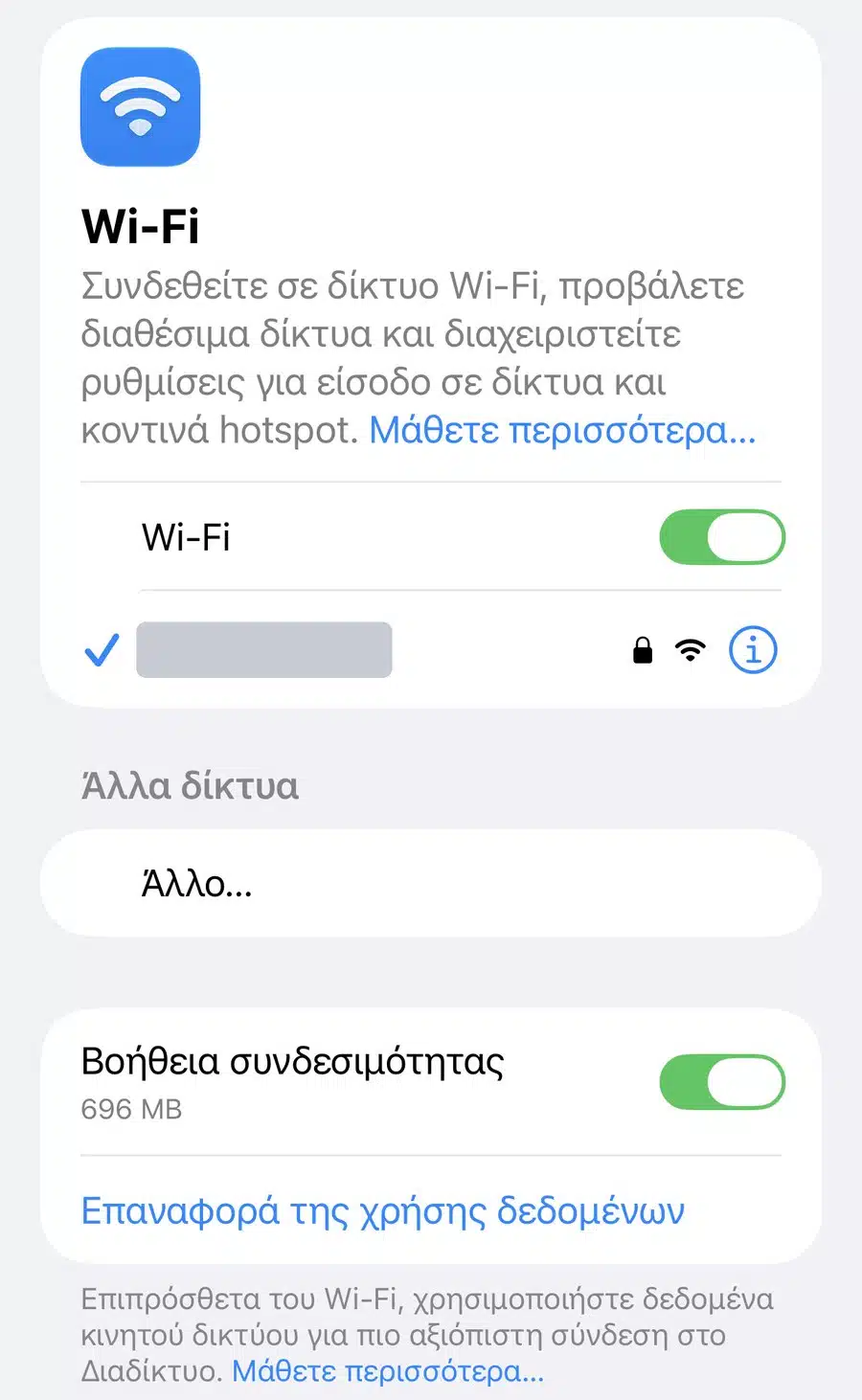
In iOS 27, when Wi-Fi is slow or not working, the iPhone uses mobile data to stay connected, while the screen still shows Wi-Fi. This is done by Connectivity Assist, which replaced Wi-Fi Assist. How much data it has used is now shown under its switch, in the Wi-Fi settings. On the iPhone we checked, it showed 696 MB.
What Connectivity Assist does in iOS 27
The feature has existed for years under another name. In iOS 27 it was renamed and moved from the Mobile Data settings to the Wi-Fi settings, as reported by MacRumors as early as the beta versions.
When it kicks in. When Wi-Fi is slow or unusable, e.g. in the garden, at the front door, in cafés and at airports.
It is most likely already on. If the old Wi-Fi Assist was on when you updated, the new feature is turned on automatically.
It uses data. Apple says that with the feature turned on, you might use more mobile data.
The topic came back into the news in November 2026 with an article by 9to5Mac, because many people can no longer find the setting where it used to be.
Where to see how much data Connectivity Assist has used
Open the Settings and tap Wi-Fi.
Scroll all the way down, below the networks.
Under the Connectivity Assist switch there is a number in MB or GB. That is the mobile data the feature has used.
With the Reset Data Usage resets the counter, so you can see how much it uses from now on.
The number under the switch shows how much mobile data the iPhone used while it was on Wi-Fi.
In the Mobile Data settings there is no longer a separate line for the feature, as there was in iOS 26. Its data is included in the total for the current period.
How to turn it off only for your home network
You don't need to turn it off everywhere. Apple lets you turn it off for a specific network:
On Settings, tap Wi-Fi.
Press the (i) next to the network you want.
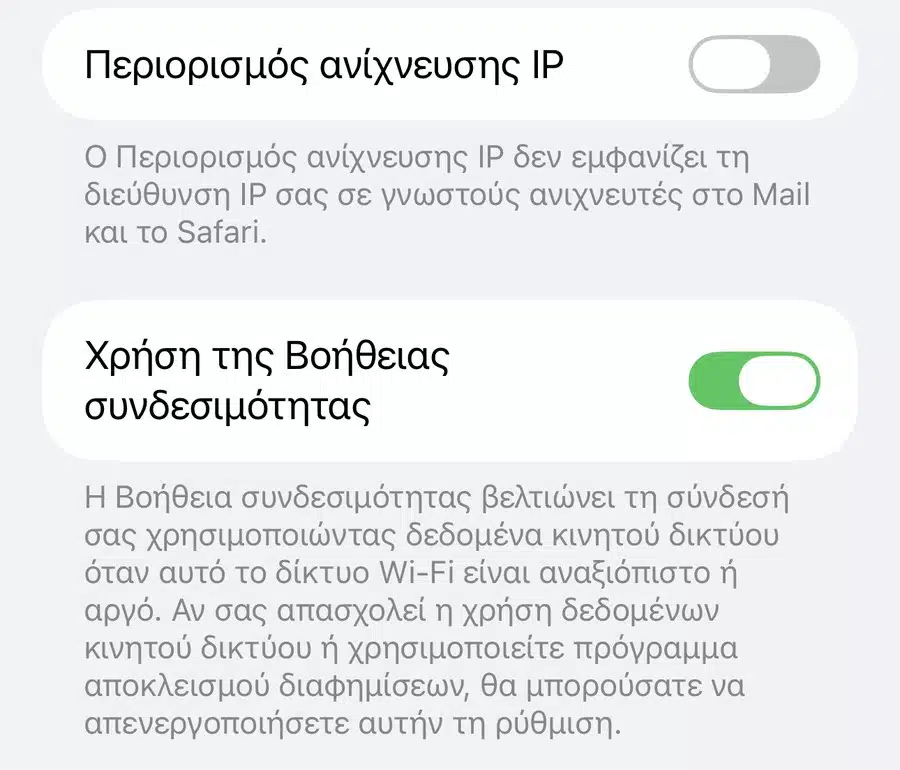
Turn off the Use Connectivity Assist.
The per-network switch: when it is off, the iPhone stays on Wi-Fi only while you are connected to this network.
Unlimited or plenty of data. Leave it on. You will have fewer interruptions in video calls and maps when the Wi-Fi is weak.
A small data plan. Check the number every few days. If it goes up quickly, turn it off.
A child's phone or a prepaid card. Turn it off, so the data doesn't run out without you noticing.
Ad blocking on the router. Apple suggests turning it off for that network, so the iPhone always stays on Wi-Fi.
When it isn't used
According to Apple, the feature isn't used:
When roaming internationally. Abroad it doesn't use data on its own.
With Low Data Mode turned on for mobile data. If it is on, Connectivity Assist isn't used.
In some third-party apps that stream audio and video.
What Apple doesn't say
Where the usage is shown. Apple's support pages don't mention the counter in the Wi-Fi settings. We confirmed it on an iPhone running iOS 27 in Greek.
Since when the number counts. It isn't stated whether it resets on its own every month or only when you reset it yourself.
Whether the way it works has changed. It hasn't been made clear whether the new feature does anything different from the old Wi-Fi Assist or whether only the name changed.
Frequently asked questions
Where is Connectivity Assist on the iPhone?
In Settings, under Wi-Fi, at the very bottom. Since iOS 27 it is no longer in the Mobile Data settings, where the old Wi-Fi Assist used to be.
Why does my iPhone use data while it is on Wi-Fi?
Usually because the Wi-Fi is slow or weak where you are. The iPhone then uses mobile data so the connection doesn't drop. You can see how much it used under the switch in the Wi-Fi settings.
If I turn it off, will I have problems?
No. The iPhone will stay on Wi-Fi even when it is slow, so a page or a video may take longer to load. You can turn it back on whenever you like.
Does it work abroad too?
No. When you are roaming internationally, the feature isn't used, so it doesn't spend roaming data without you knowing.
Which iPhones have Connectivity Assist?
Those running iOS 27. According to MacRumors, iOS 27 supports the iPhone 11 and later, as well as the iPhone SE (2nd generation) and later.
If your iPhone loses Wi-Fi even right next to the router
If the number keeps going up while you are right next to the router, first check whether other devices at home have a good signal. If they do, and your iPhone keeps dropping the Wi-Fi or finds it weak, the Wi-Fi antenna may be the problem, e.g. after a drop or contact with liquids.