
Apple with the release of iOS 18 seems to have introduced a new, easier way to turn off iPhones, without the use of physical buttons.

Specifically, to turn off your device now:
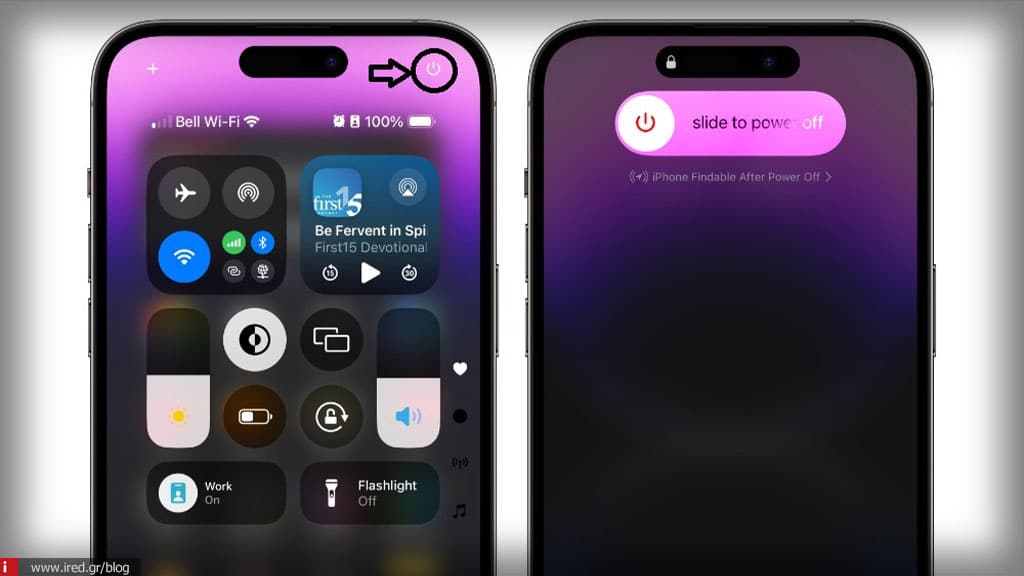
- Open the Control Center: drag your finger from the top right corner of the screen downwards to open the Control Center.
- Tap on the Power Button icon: find the new Power Button icon that has been added to the Control Center. Tap and release it.
Read also: iOS 18.1: What is the release date of the update that introduces artificial intelligence on iPhones?
- Display the indicator for deactivation: "Slide to Power Off" will appear on your screen. From there you can slide the icon to turn off your iPhone.
If you don't slide, the device will automatically lock after 10 seconds and require a passcode to unlock, just like before. This new way is especially useful if some of the device's physical buttons don't work properly.
Read also: Apple Music Classical 2.0: Available with accompanying booklets for thousands of albums